In acro mode (also called rate mode) the sticks of the transmitter don’t command an angle but a rotation rate. Holding the roll stick halfway makes the quad keep rolling at a certain rate in degrees per second (°/s), and centering the stick stops the rotation, so the quad keeps its current attitude. How stick deflection translates into rotation rate is defined by the rates, separately for roll, pitch and yaw. Good rates allow precise small corrections around the stick center and still fast flips and rolls at full deflection.
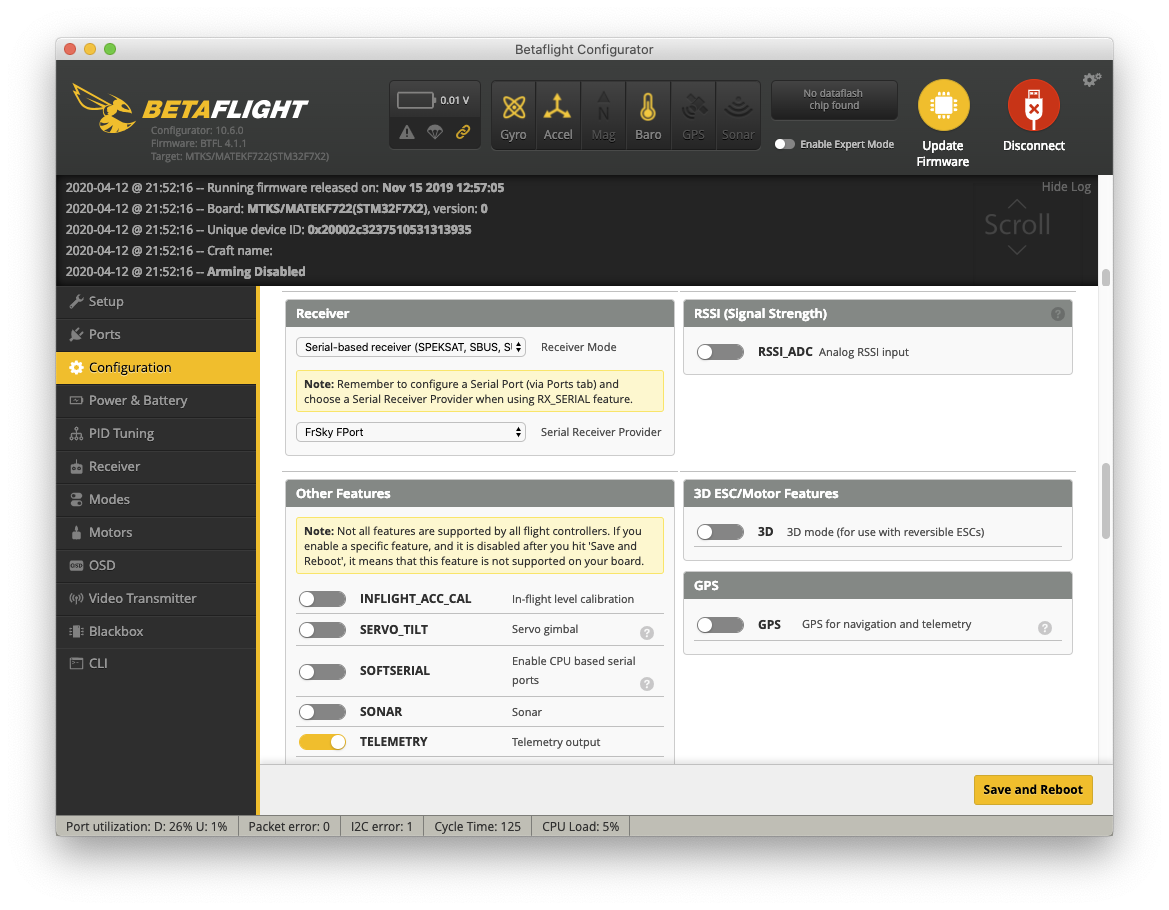
The rates are set in the PID Tuning tab of the Betaflight Configurator (today the Betaflight App), which also shows a preview of the resulting curve and the maximum rate. They only take effect once the receiver works. For the R-XSR of this build, the receiver mode in the Configuration tab is set to a serial receiver with the FPort provider:
Betaflight offers several rate types (Betaflight, Actual, Quick, RaceFlight and KISS), which describe a similar curve with different parameters.
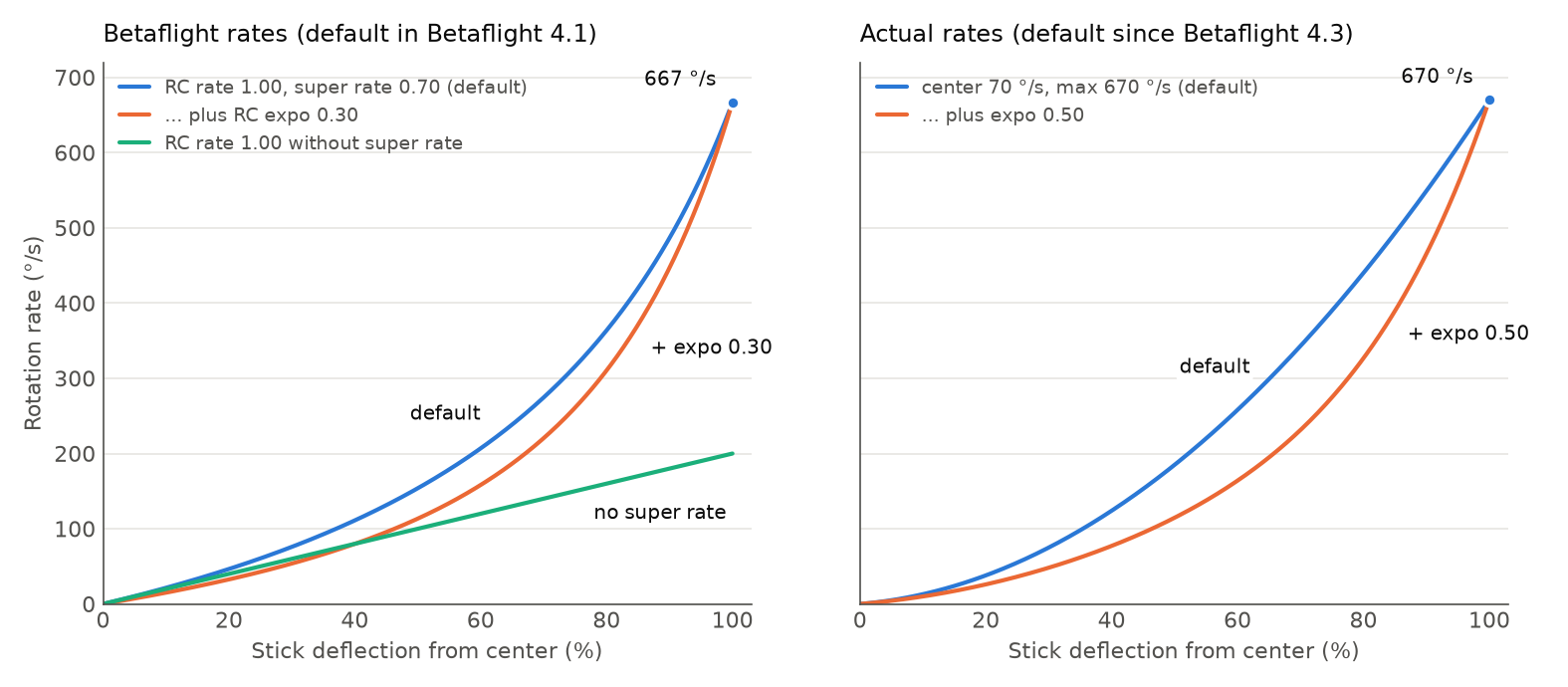
Up to Betaflight 4.2 the default was the Betaflight rate type, since Betaflight 4.3 it is Actual rates.
Both are explained below. The formulas are taken from the Betaflight source code (rc.c),
where $x$ is the stick deflection from $-1$ (full left or down) over $0$ (center) to $1$ (full right or up).
Betaflight Rates: RC Rate, Super Rate and RC Expo
The Betaflight rate type has three parameters per axis:
- RC Rate $r$ scales the whole curve linearly. With an RC rate of 1.00 and no super rate, full stick results in 200 °/s. Above 2.0 the RC rate increases much faster, because Betaflight adds $14.54 \cdot (r - 2)$ to it.
- Super Rate $s$ makes the curve steeper towards full deflection, which increases the maximum rate without making the center more sensitive.
- RC Expo $e$ flattens the curve around the center for finer control. It doesn’t change the maximum rate.
Expo is applied to the stick deflection first, then RC rate and super rate:
\[x_e = x \, |x|^3 \, e + x \, (1 - e)\] \[\omega = 200 \cdot r \cdot x_e \cdot \frac{1}{1 - |x| \, s}\]At full deflection ($|x| = 1$) the expo term has no effect and the maximum rate becomes $\omega_{\max} = 200 \, r / (1 - s)$. The default values of Betaflight 4.1, RC rate 1.00, super rate 0.70 and RC expo 0, result in $200 / 0.3 \approx 667$ °/s:
| Setting | 25 % stick | 50 % stick | 75 % stick | Full stick |
|---|---|---|---|---|
| RC rate 1.00, super rate 0.70 (default) | 61 °/s | 154 °/s | 316 °/s | 667 °/s |
| RC rate 1.00, super rate 0.70, RC expo 0.30 | 43 °/s | 113 °/s | 261 °/s | 667 °/s |
| RC rate 1.00 without super rate | 50 °/s | 100 °/s | 150 °/s | 200 °/s |
Actual Rates: Center Sensitivity, Max Rate and Expo
Actual rates describe the same kind of curve with parameters that are given directly in °/s:
- Center Sensitivity $c$ is the slope of the curve at the stick center, given as the rate that full stick would result in if the curve stayed this steep.
- Max Rate $m$ is the rotation rate at full stick deflection.
- Expo $e$ shapes the curve in between. Higher expo keeps the curve flat longer and makes it steeper towards the end.
The defaults since Betaflight 4.3 are a center sensitivity of 70 °/s, a max rate of 670 °/s and an expo of 0, which ends at almost the same maximum rate as the old defaults:
| Setting | 25 % stick | 50 % stick | 75 % stick | Full stick |
|---|---|---|---|---|
| Center 70 °/s, max 670 °/s (default) | 55 °/s | 185 °/s | 390 °/s | 670 °/s |
| Center 70 °/s, max 670 °/s, expo 0.50 | 36 °/s | 115 °/s | 275 °/s | 670 °/s |
Because center sensitivity and max rate are independent, it is easier to change one aspect of the curve with Actual rates: a higher max rate makes flips and rolls faster without touching the feel around the center.
Choosing Rates
There are no right rates, they depend on how you fly. A few rules help when changing them:
- Start with the defaults and change one parameter at a time in small steps, then fly before changing the next one.
- The max rate determines how fast flips and rolls are at full stick. Center sensitivity (or RC rate) and expo determine how precisely you can make small corrections.
- Apply expo only in one place. Radio firmware such as OpenTX or EdgeTX can also add expo or rates to the stick inputs, and both add up. Keep the sticks linear on the radio (weight 100 %, expo 0) and set the rates in Betaflight.
The throttle stick is shaped separately, see Setting up Throttle Curves.
Comments